Your cart is empty
Add a ChronoPad to protect your MacBook and complete your setup.
Browse ChronoPads

Quick answer
Does an Apple Watch scratch a MacBook? It can, and the part that does it is usually the band, not the watch. A Milanese Loop or a Link Bracelet drags steel across the anodised aluminium with every keystroke; a Solo Loop or Sport Loop puts only fabric or silicone there.

When you type, the underside of your wrist rests on the palm rest next to the trackpad, and that is where the clasp, the buckle or the metal mesh of an Apple Watch band sits.
Below is what each Apple Watch case and band brings into contact with the MacBook, and how to keep both of them unmarked.
Look at your wrist while you type. The watch face points up and away from the laptop. What rests on the palm rest is the underside of the wrist: the band, its closure, and on a loose fit the lower edge of the case.
That changes the usual question. It is less about whether your Apple Watch is aluminium or titanium and more about what is on the underside of your band.

The materials below come from Apple’s own guide to Apple Watch bands. The risk rating is our assessment of what touches the deck while you type.
Solo Loop, Braided Solo Loop
What touches the palm restSilicone or woven yarn, no hardware
Sport Loop
What touches the palm restWoven nylon, hook-and-loop fastener
Sport Band
What touches the palm restFluoroelastomer; the steel pin is tucked in on most fits
Ocean, Alpine and Trail Loop
What touches the palm restFabric or rubber with titanium hooks or buckles
Leather bands with a buckle
What touches the palm restLeather plus a metal buckle on the underside
Milanese Loop, Titanium Milanese Loop
What touches the palm restSteel or titanium mesh across the whole underside
Link Bracelet
What touches the palm restStainless steel links and a butterfly closure
The pattern is the same as with a traditional watch, which we cover in do watches scratch laptops: metal on the underside of the wrist marks the palm rest, fabric and rubber do not.

ChronoPad® palm rest protector
Keep the watch on: two 3 mm pads between band and aluminium
Colour-matched, removable without residue. €32,95 per set.
Air 13″ setPro 14″ setPro 16″ setLess than people think, but it is not irrelevant. On a loose band, or when you lift your hand to the trackpad, the lower edge of the case can touch the deck.
Apple currently makes the case in three materials, according to its technical specifications:
Apple Watch SE 3
Case optionsAluminium
Apple Watch Series 9
Case optionsAluminium or stainless steel
Apple Watch Series 10 and Series 11
Case optionsAluminium or titanium (titanium replaced stainless steel in 2024)
Apple Watch Series 12
Case optionsAluminium, titanium or ceramic
Apple Watch Ultra 2, Ultra 3 and Ultra 4
Case optionsTitanium
An aluminium case is the same kind of anodised aluminium as the MacBook, so contact tends to mark both, and the watch often comes off worse. Titanium and stainless steel are tougher and keep their shape, so the MacBook takes the damage.
The bigger risk in both cases is what sits between them: a grain of sand or dust trapped under a metal edge acts like sandpaper on the thin anodised layer of the palm rest.
Key takeaway
With an Apple Watch on your wrist, the band decides whether your MacBook gets scratched. The case only joins in on a loose fit.
Watch and band marks show up as fine, parallel hairlines on the left palm rest (or the right one if you wear the watch on your right wrist), usually at the front edge where the wrist rests. On a Space Black or Midnight MacBook they catch the light first.

We go through the options in can you remove scratches from a MacBook palm rest.

The band rests on fabric instead of aluminium, so neither the watch nor the MacBook takes the contact.
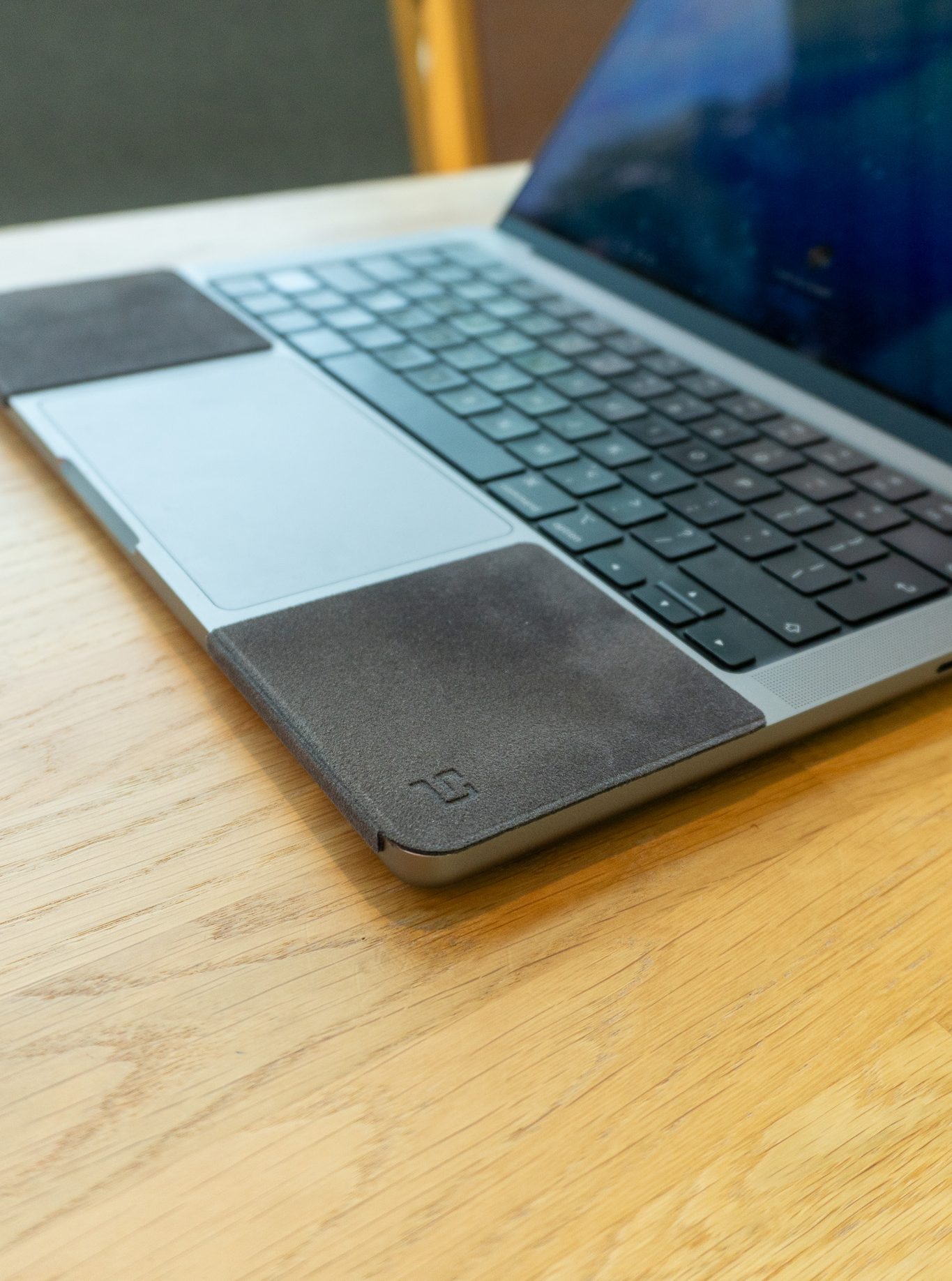
Taking the watch off is the only option that costs nothing, but most people who wear an Apple Watch wear it for the notifications, the activity rings or the calls, which is exactly when they are at the laptop.
If you also wear a ring or a bracelet, the same pads cover that contact zone too.
Keep your Apple Watch on, and your MacBook unmarked
Two colour-matched 3 mm pads for the MacBook Air 13″, MacBook Pro 14″ or MacBook Pro 16″, €32,95 per set. Removable without residue.
Choose your sizeShop ChronoPad®It can. The underside of your wrist rests on the palm rest while you type, so metal band hardware such as a Milanese Loop or Link Bracelet scratches the anodised aluminium. Silicone and fabric bands like the Solo Loop and Sport Loop carry very little risk.
A Solo Loop, Braided Solo Loop or Sport Loop, because they have no metal on the underside of the wrist. The Sport Band is a close second, as its steel pin is tucked away on most fits.
Titanium keeps its shape, so on contact the MacBook takes the mark, while an aluminium case tends to get marked itself. On a snug band the case rarely touches the deck; the band and any trapped grit matter more.
Surface residue from the band wipes off with a damp microfibre cloth. Scratches you can feel with a fingernail are in the anodised layer and cannot be polished out without changing the finish.
Wear a soft band at the desk, keep the band snug, keep both surfaces free of grit, or cover the palm rest with a thin pad such as a ChronoPad®, which puts 3 mm of microfibre between the band and the aluminium.
ChronoPad® is an independent brand and is not affiliated with, endorsed by or sponsored by Apple or any other brand mentioned.

Read article

Read article


Coming soon
Leave your details and we will let you know as soon as the ChronoPad for the is available.
"*" indicates required fields