Your cart is empty
Add a ChronoPad to protect your MacBook and complete your setup.
Browse ChronoPads

MacBook skins are thin vinyl wraps, cut to the shape of the lid, the underside and sometimes the palm rest, that change how a MacBook looks and keep light scuffs off the aluminium. A palm rest protector does something narrower: it covers only the two areas beside the trackpad, where your wrists, your watch and your rings touch the laptop for hours every day. Most people who look at MacBook skins are trying to solve one of those two problems. Knowing which one is yours saves you buying the wrong thing.
A skin is a printed or textured vinyl film with a low-tack adhesive, precision-cut for one specific model. Most reputable makers work with cast vinyl from the big adhesive brands, so fit, cut quality and removability differ more between brands than the material itself does. Applied well, a skin adds almost nothing in thickness or weight.
What a skin is good at: a new colour or texture on the lid, hiding marks that are already there, and taking the small knocks of a bag, a desk or a charger cable. What it is not built for is cushioning. A film that thin cannot stop a steel bracelet edge from pressing down on the deck. The scratch still happens, it just lands in the vinyl instead of in the aluminium.
On the lid and the base, a skin mostly sits there. On the palm rest it is rubbed by skin, sweat and watch hardware all day, and that is where skins tend to show wear first: corners lift, edges collect grime, and a textured finish goes smooth under the heel of your hand. It is also why plenty of skin sets leave the palm rest out altogether.
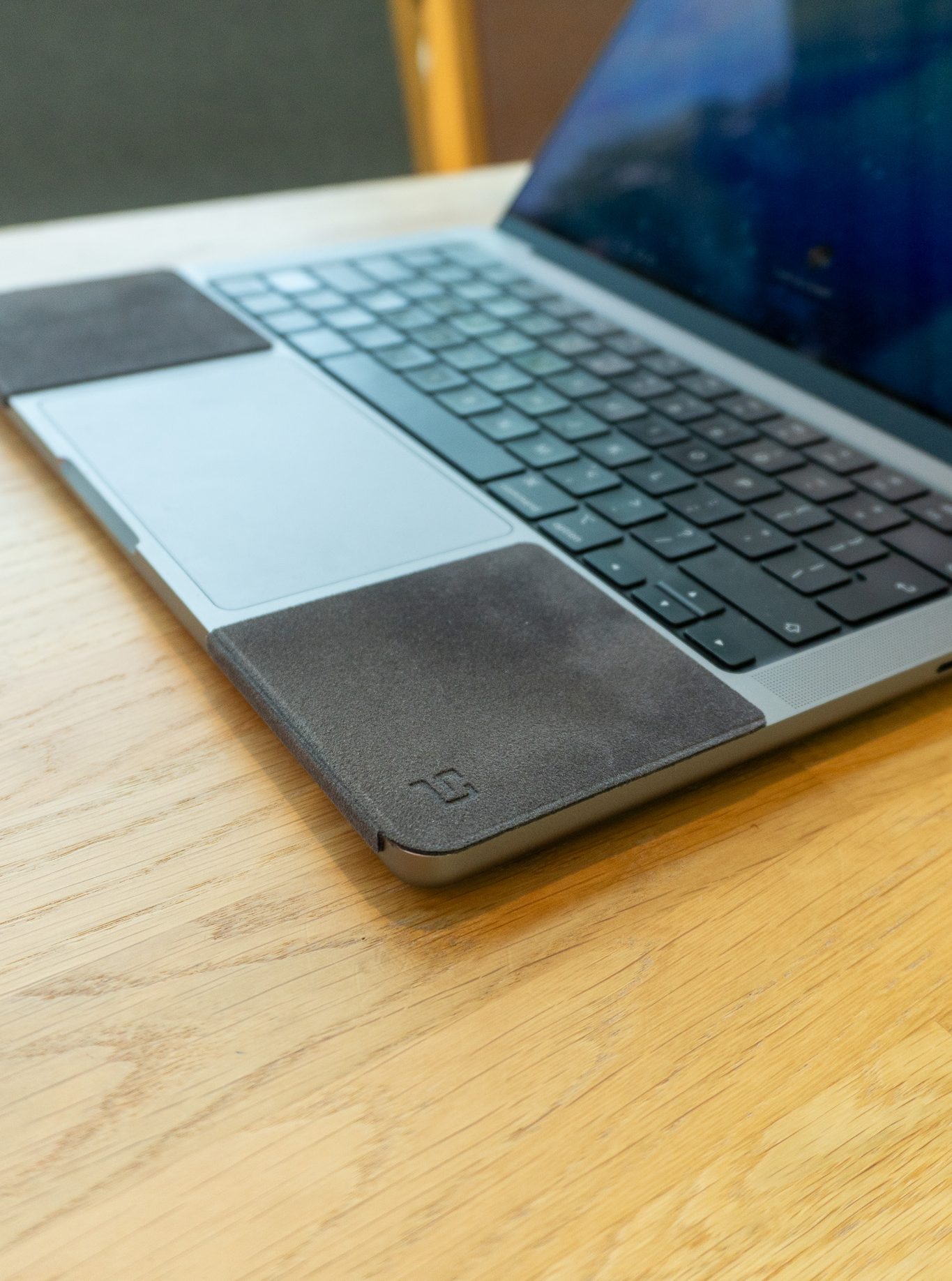
A palm rest protector is a small, thicker pad for the contact zone only. A ChronoPad® is 3 mm: a polyester microfibre top layer, a closed-cell foam core and a removable acrylic adhesive underneath. Each set has two pads, one for each side of the trackpad, shaped to the millimetre for the MacBook Air 13″, the MacBook Pro 14″ and the MacBook Pro 16″. Applied correctly, a pad leaves 3 mm to the keyboard and 5 mm to the trackpad.
Because it has real depth, a palm rest protector does something a skin cannot: your watch lands on fabric and foam instead of on anodised aluminium. The same goes for rings and bracelets, and for the sweat and skin oil that slowly leave a darker, shinier patch beside the trackpad.

| MacBook skin | Palm rest protector (ChronoPad®) | |
|---|---|---|
| Coverage | Lid, base, sometimes the palm rest | Palm rest only, beside the trackpad |
| Build | Vinyl film, a fraction of a millimetre | 3 mm microfibre and closed-cell foam |
| Main job | Looks, light scuffs from bags and desks | Wrist, watch and jewellery contact |
| Steel bracelet edge | The vinyl takes the scratch | The foam takes the contact |
| Sweat and skin oil | Wears and lifts first at the palm rest | Fabric top, easy to lift off and clean |
| Colour | Any print or texture | Matched to all five MacBook colours |
| Removal | Peel slowly, quality varies by brand | Lifts off without residue |
A skin changes what your MacBook looks like. A palm rest protector changes what your wrist touches.
They do not compete. A skin on the lid with a ChronoPad® on the palm rest is a sensible combination: the skin handles the bag, the pad handles the desk. Leave out the palm rest pieces of the skin and apply the pads straight onto the clean aluminium, as described in the installation guide, so the adhesive holds to the MacBook and not to a layer of vinyl.
Scratches and dents are cosmetic damage, and Apple’s one-year limited warranty does not cover cosmetic damage. That leaves the palm rest, the one part of the laptop you touch all day, as the part you protect yourself. The physics are not on your side either: a steel bracelet is roughly twice as hard as the aluminium it rests on, which we explain in steel vs aluminium.
Protect the part you actually touch
Two colour-matched 3 mm pads per set, cut for the MacBook Air 13″, MacBook Pro 14″ or MacBook Pro 16″. €32,95 per set.
Find your sizeShop ChronoPad®For the lid and the base, yes, if you want a new look or protection against bag and desk scuffs. For the palm rest they are the weakest option, because that is where vinyl wears and lifts first and where it does the least against a watch.
Only partly. The vinyl takes the scratches instead of the aluminium, but it wears fastest in exactly the spot where your watch rests, so you end up replacing the skin or looking at a scuffed skin.
It is made to stick to the bare MacBook deck. On top of vinyl, the adhesive holds to the skin rather than to the aluminium, so if the skin lifts, the pad lifts with it. Leave the palm rest area of the skin off and apply the pads directly.
Slightly, and in a way most people like: your wrists rest on 3 mm of microfibre and foam instead of on cool, hard aluminium. The keyboard and the trackpad are not covered, so typing and clicking feel the same.
Pick the size of your MacBook: the 13″ for the MacBook Air 13″, the 14″ for the MacBook Pro 14″ and the 16″ for the MacBook Pro 16″. The exact pad dimensions are listed on the MacBook palm rest protector page.


Read article


Read article
Coming soon
Leave your details and we will let you know as soon as the ChronoPad for the is available.
"*" indicates required fields