Votre panier est vide
Ajoutez un ChronoPad pour protéger votre MacBook et compléter votre installation.
Découvrir les ChronoPads

Réponse rapide
A ChronoPad is a 3 mm pad built in three layers: a polyester microfibre top, a closed-cell foam core and a removable acrylic adhesive underneath. Each layer has one job. The microfibre on top takes the daily contact, so it is worth knowing what it is made of, what it does well and what it does not do.
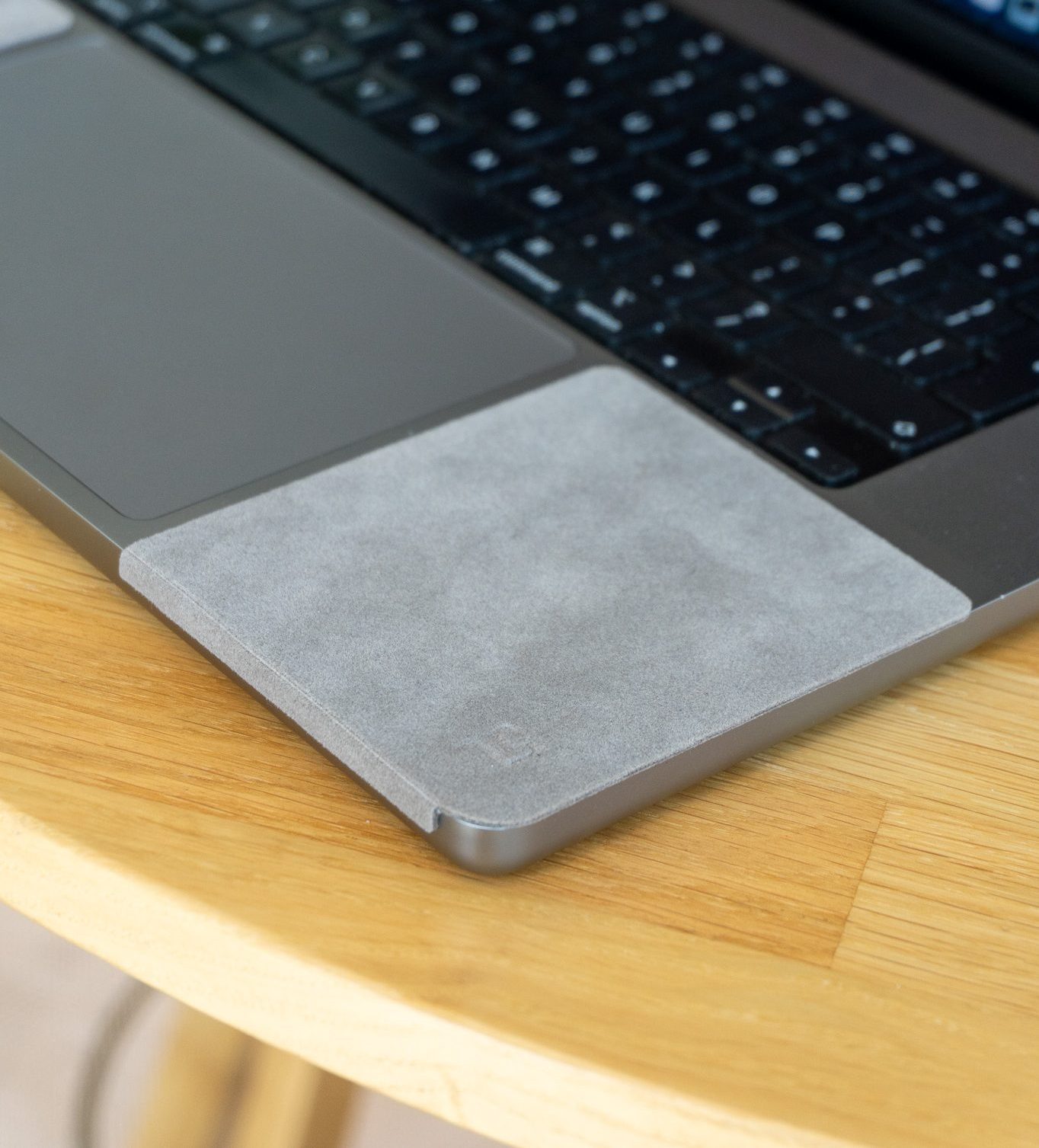
Microfibre is a synthetic fibre made of threads finer than one denier, with a diameter under ten micrometres. The common types are polyester and polyamide, and the top layer of a ChronoPad is polyester. Fibres that fine make a soft surface, which is the point on a palm rest: a wrist or a metal bracelet lands on fabric instead of on anodised aluminium.
There is a trade-off, and we would rather state it than leave you to find it. Microfibre traps and holds dirt, absorbs oils especially well, and its electrostatic properties attract dust. On a cleaning cloth those are the features. On a palm rest they mean the pad takes the skin oil and the dust that the aluminium would otherwise get. That is the intended swap: wear moves from the finish of your MacBook onto a layer you can peel off. It also means the pad will not look factory-new forever.
We have not published a wear test, so we will not put a lifespan on it. A set ships with care instructions, and those are the reference for keeping the top layer clean. Why oils matter at all on a palm rest is explained in our post on palm rest discolouration.
In a closed-cell foam the gas pockets are sealed off from one another, so the foam has low moisture uptake. An open-cell sponge is the opposite: water flows through the whole structure. For a pad that sits under a sweaty wrist, a core that does not soak up liquid is the sensible choice. That is our reading of the material, not a lab result from ChronoPad.
The same layer is what makes the pad compressible. The product pages describe it as soft and thin, at 3 mm. Under a wrist the foam gives a little, where bare aluminium does not. The pad lies flat on the palm rest, so that is the only area it changes. The front edge of the MacBook keeps exactly the shape it has. If the edge is your problem, read our post on MacBook sharp edges and wrist pain first.
The adhesive is acrylic and designed to come off. ChronoPad says the pad lifts off without residue when used correctly, and that it is reusable and removable. Residue is the right test for any sticky accessory.
There is no cutting or trimming. The guide d’installation for the MacBook Pro and the 2022 or newer MacBook Air has four steps:


Protection de repose-poignets ChronoPad®
Three layers, one job each
3 mm microfibre pad, shaped to the millimetre. €32,95 per set.
Lot Air 13″Lot Pro 14″Lot Pro 16″A set is two pads, one on each side of the trackpad, and both pads in a set share the same dimensions. The front edge, the strip nearest you, is narrower so the pad stays clear of the trackpad. Applied correctly, it leaves 3 mm to the keyboard and 5 mm to the trackpad.
MacBook Air 13″
Taille par pad83 × 86 mm
Front-edge strip72 mm
CouleursSilver, Midnight
MacBook Pro 14″
Taille par pad86 × 86 mm
Front-edge strip75 mm
CouleursArgent, Noir sidéral
MacBook Pro 16″
Taille par pad93 × 105 mm
Front-edge strip82 mm
CouleursArgent, Noir sidéral
The sizes are cut for MacBook decks. For another laptop, ChronoPad’s advice is to measure your palm rest in millimetres and compare it with these three sizes, and it does not guarantee a fit outside the MacBook range. The laptop palm rest protector page has the size finder.

Where to look for your MacBook model: three ways
À propos de ce Mac
Open the Apple menu, then About This Mac. The first line is the model name, for example MacBook Air (13", M4, 2025). The line below it shows the chip.
The serial number
Find it on the underside of the MacBook and on the box. Enter it on Apple’s Check Coverage page, which gives you the exact model back.
Ports and shape
HDMI port and SD card slot: MacBook Pro 14″ or 16″ from 2021 or later. Two USB-C ports plus MagSafe: MacBook Air from 2022 or later.
Not sure which MacBook you own? Start with how to find your model, size and year.
À retenir
The microfibre takes the wear instead of your MacBook. That is the intended swap, and it means the pad will not look factory-new forever.
See which set fits your MacBook
Two colour-matched 3 mm pads for the MacBook Air 13″, MacBook Pro 14″ or MacBook Pro 16″, €32,95 per set.
Choisissez votre tailleAcheter ChronoPad®They do different jobs. Our comparison notes that skins are thin vinyl that wear and lift first on the palm rest, and offer little cushioning against a watch bracelet. A pad is 3 mm thick and covers only the contact area. Our comparison suggests a skin on the lid and a pad on the palm rest.
ChronoPad describes it as thin enough that your hand does not notice it. That is the brand’s description, and feel is personal. Every order has a 21-day return window from delivery, so you can find out on your own MacBook.
ChronoPad says it lifts off without residue when used correctly. Applying it to a clean, dry palm rest is the first installation step for that reason.
Silver and Midnight for the MacBook Air 13″, Silver and Space Black for the MacBook Pro 14″ and 16″. See the full range in the shop or on the MacBook palm rest protector page.
ChronoPad® is an independent brand, not affiliated with, endorsed by or sponsored by Apple Inc.

Lire l’article

Lire l’article

Lire l’article
Bientôt disponible
Laissez vos coordonnées et nous vous préviendrons dès que le ChronoPad pour le sera disponible.
« * » indique les champs nécessaires